TikTok Cover & UI Safe Zone Preview Tool
Make sure TikTok's right-side action icons, bottom caption block, and 3-column profile grid never hide your hook text or subtitles. Works for YouTube Shorts and Instagram Reels too.
TikTok Thumbnail Previewer
Upload, drag & drop, or paste (Ctrl+V) an image to preview on TikTok
Upload or Drop Image
Drag & drop anywhere here, or press Ctrl+V. JPG, PNG, GIF, WebP (Max 5MB).
Image URL
Live TikTok Preview
Click to select an image, drag & drop, or paste a screenshot
100% browser-based — your files never leave your device
Exact 1080 × 1920 Pixel Safe-Zone Margins for TikTok (2026)
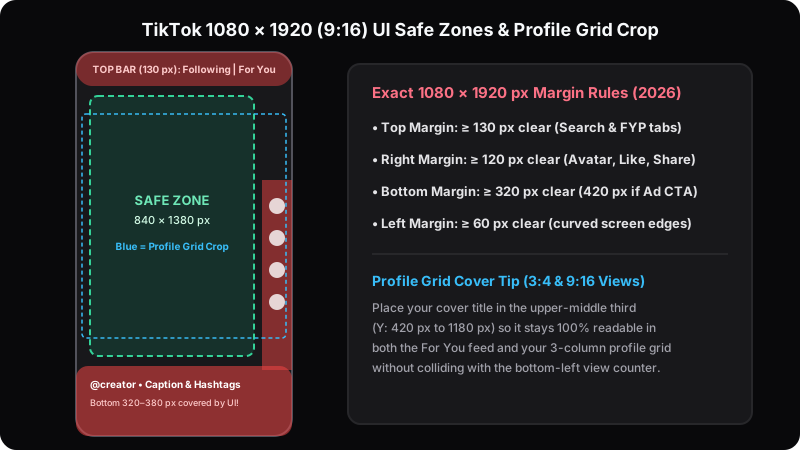
Unlike horizontal players where metadata sits underneath the video, TikTok overlays its entire navigation and engagement interface directly on top of your 1080 × 1920 px (9:16) frame. Consistent with TikTok Creative & In-Feed safe-zone specifications, keep every on-screen caption and cover sticker inside the central 840 × 1380 px safe window.
| Screen Edge | Clearance Margin (px) | UI Elements Blocking View |
|---|---|---|
| Top Edge | ≥ 130 px (top 7%) | LIVE icon, Following / For You tabs, Search icon |
| Right Edge | ≥ 120 px (right 11–13%) | Creator avatar, Like, Comment, Bookmark, Share & spinning audio disc |
| Bottom Edge (Organic) | ≥ 320–380 px (bottom 18%) | @handle, multi-line caption, hashtags, sound marquee, scrubber |
| Bottom Edge (Spark / Ads) | ≥ 420–480 px (bottom 24%) | Sponsored tag + interactive “Shop Now / Learn More” CTA card |
| Left Edge | ≥ 60 px | Curved smartphone bezels & aspect-ratio crop on narrower 19.5:9 screens |
TikTok Safe Zone & Profile Cover Alignment Blueprint
When visitors tap your @handle to binge-watch series parts, they scan your 3-column profile grid. Place your 3–5 word cover badge between Y: 420 px and Y: 1180 px so it remains centered in profile tiles and clear of the bottom-left view counter.
TikTok Cover & Safe Zones — FAQ
What are the exact TikTok cover dimensions and UI safe zones?+
TikTok covers use 1080 × 1920 pixels (9:16). Keep text at least 130 px below the top edge, 120 px away from the right engagement buttons, and 320 to 380 px above the bottom caption and sound ticker.
Where should I place cover text so it stays visible on my TikTok profile grid?+
Position your 3–5 word cover hook in the upper-central safe box (roughly X: 80–940 px, Y: 420–1180 px) so neither the For You UI nor profile grid cropping hides it.
Can I test YouTube Shorts and Instagram Reels covers with this tool?+
Yes. TikTok, YouTube Shorts, and Instagram Reels all share the 1080 × 1920 (9:16) vertical canvas with right-side action buttons and bottom metadata overlays.
Does TikTok compress uploaded custom cover images?+
Yes. Exporting a sharp 1080 × 1920 PNG or high-quality JPG with high-contrast bold typography prevents muddy compression artifacts around red and neon text.
Short-Form Cover & Multi-Platform Guides
 16:9 vs 9:16
YouTube vs. TikTok & Shorts Covers in 2026: Horizontal vs. Vertical Guide
Adapt horizontal 16:9 compositions into 9:16 vertical covers without hitting TikTok or Shorts UI buttons.
 Instagram 3:4
Instagram 4:5 Feed & 3:4 Profile Grid Size Guide (2026): Stop Cropped Covers
Keep carousel headlines and Reels covers centered inside the 1012×1350 safe zone on vertical grids.
 2026 Spec Sheet
Social Media Thumbnail Sizes in 2026: Exact Dimensions for Every Platform
Master pixel specs, aspect ratios, file limits, and crop thresholds across all 7 networks plus Open Graph.