
Pre-Publish Social Media Preview Workflow (2026): QA Checklist for Creators
Avoid cropped titles, dark-mode washout, and broken Open Graph link cards with this 2026 pre-publish thumbnail preview workflow across 7 networks.
Test While You Read — 100% Free & Browser-Private
Open our interactive mockups to check your own images against the exact 2026 specs below:
Running every campaign asset through a social media thumbnail preview tool before hitting publish eliminates the four costliest launch mistakes in 2026: unreadable 168×94 pixel mobile titles on YouTube, clipped 3:4 profile grid headlines on Instagram and TikTok, vanished dark-on-dark silhouettes on #0F0F0F Dark Mode feeds, and broken 1200×630 Open Graph link cards. Four minutes of local viewport simulation protects 100% of your launch-hour algorithmic velocity.
Fixing a broken thumbnail after publishing rarely recovers lost reach. Subscriber push notifications fire immediately at minute zero, TikTok locks video covers permanently upon upload, and LinkedIn or Slack link crawlers cache broken og:image URLs for days. Below is the complete 2026 pre-publish quality-assurance (QA) standard operating procedure across seven networks.
Key Takeaways in 30 Seconds (4-Minute QA Protocol)
- Step 1 — Scale Down First: Inspect every graphic at
168 × 94 px(mobile suggested rail) before evaluating it at full 27-inch monitor size. - Step 2 — Flip Light & Dark Themes: Check dark subject edges against
#0F0F0FDark Mode and bright white backgrounds against#FFFFFFLight Mode. - Step 3 — Toggle UI Safe Zones: Verify YouTube duration badges, Instagram
34 pxlateral grid trims, and TikTok right/bottom icon docks. - Step 4 — Validate Open Graph Tags: Confirm
1200 × 630 pxHTTPSog:imagetags across X, LinkedIn, Facebook, Discord, and WhatsApp before sharing.
Why Post-Upload Fixes Cost Creators 35% of Launch-Hour Velocity
Distribution algorithms on YouTube, Instagram, LinkedIn, and TikTok weight first-60-minute impression click-through rate heavily when deciding whether to expand cold Browse reach. Discovering a clipped headline or blank link preview 20 minutes after launch wastes up to 35% of warm subscriber impressions.
Inside Figma or Photoshop, a 1280×720 or 1080×1920 artboard fills a 27-inch studio monitor at crisp 100% zoom surrounded by neutral gray pasteboard. Real viewers never see that isolated view. They encounter your thumbnail shrunk by 75% to 87%, stamped with timestamps or domain badges, and sandwiched between loud competing creators.
| Platform | Most Frequent Pre-Flight Defect | Post-Publish Edit Penalty | Mandatory Pre-Publish Check |
|---|---|---|---|
| YouTube (1280 × 720 px) | Bottom-right hook covered by 150 × 56 px duration pill | First-hour push notifications serve broken version | 168 × 94 px mobile rail + Dark Mode check |
| TikTok (1080 × 1920 px) | Top/bottom 240 px sliced off on 1080 × 1440 (3:4) grid | Cover locked forever; requires deleting video | 840 × 1100 px dual feed/profile safe mask |
| Instagram (1080 × 1350 px) | Outer 34 px side text clipped on 3:4 profile tiles | Carousel slides cannot be swapped without re-post | 1012 × 1350 px center grid alignment |
| X / Twitter (1200 × 628 px) | Bottom-left 240 × 44 px domain pill hides KPI badge | Tweets cannot edit attached URL card history cleanly | summary_large_image overlay simulation |
| LinkedIn (1200 × 627 px) | 5 MB+ PNG rejected or cached stale og:image served | 7-day crawler cache unless filename versioned | Under-5 MB sRGB JPG + Post Inspector check |
| Facebook (1200 × 630 px) | Sub-600 × 315 px image collapses to tiny side square | Requires manual Meta Sharing Debugger scrape | 1200 × 630 px explicit width/height meta tags |
| Pinterest (1000 × 1500 px) | Ultra-tall >1:2.1 graphic truncated in 236 px feed column | Pin image locked once saved by downstream boards | 2:3 ratio check at 236 px mobile width |
One glance at column three shows why reactive editing fails. On TikTok and Pinterest, cover defects are irreversible without wiping engagement metrics back to zero.
Stage 1 QA: Simulating Viewport Scale, UI Chrome, and Dark Mode Surfaces
Stage 1 visual QA tests every exported raster across three real-world constraints before upload: smallest mobile viewport scale (168×94 px on YouTube, 236 px width on Pinterest), platform UI chrome overlays, and Light Mode (#FFFFFF) versus Dark Mode (#0F0F0F) background luminance.
Designers frequently inspect typography at 1280×720 pixels and assume a 36-point subtitle reads cleanly. Shrink that exact raster by 86.8% into a 168×94 pixel mobile Watch Next card and any stroke thinner than 3 pixels dissolves into anti-aliased mush.
Catching Timestamp Collisions, 3:4 Grid Cuts, and Contrast Washout
Execute four rapid visual toggles inside interactive feed simulators prior to scheduling:
- YouTube multi-surface scaling (YouTube Help 1280×720 spec): Load your export into the YouTube thumbnail preview tool alongside a draft 55-character title. Confirm the bottom-right 150×56 pixel timestamp pill clears all text, verify 168×94 mobile legibility, and toggle Dark Mode to ensure dark studio backdrops don't merge into
#0F0F0F. - Instagram 4:5 feed vs. 3:4 profile grid: Drop portrait carousels (1080×1350 px) and Reel covers (1080×1920 px) into the Instagram grid preview tool. Verify that 34-pixel horizontal trims on 4:5 posts and 285-pixel vertical feed trims on 9:16 Reels leave every letter intact inside the central 1012×1350 pixel safe box.
- TikTok dual-mask clearance: Check 1080×1920 vertical covers inside the TikTok safe-zone previewer so right-side 120-pixel action icons, bottom 400-pixel captions, and the 1080×1440 (3:4) profile grid crop never collide with episode badges.
- Pinterest 236-pixel Masonry column test: Preview 1000×1500 (2:3) pins in the Pinterest pin simulator to confirm script subheadings stay readable inside narrow 2-column smartphone grids.
Stage 2 QA: Auditing Open Graph Meta Tags and Link Preview Cards
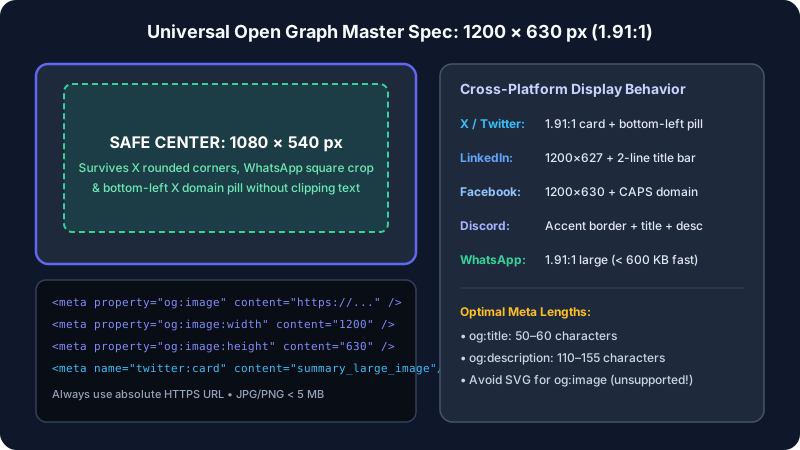
Stage 2 link-card QA validates your HTML <head> metadata so automated crawlers on X, LinkedIn, Facebook, Slack, Discord, WhatsApp, and iMessage render crisp 1200×630 (1.91:1) rich cards instead of broken icons or truncated titles.
Unlike native image uploads, link previews depend entirely on server-rendered HTML tags defined by the Open Graph Protocol and Meta Sharing Documentation. If a JavaScript single-page app injects og:image strictly on the client via browser hydration, non-executing crawlers see an empty head tag and render a blank gray box.
Debugging Relative Paths, Redirect Chains, and X Domain Pill Overlays
Audit these five technical rules inside our Open Graph link card checker, X card previewer, LinkedIn card tester, and Facebook share simulator before pushing any blog post or landing page live:
- Use absolute HTTPS URLs only: Always emit
https://yourdomain.com/og/launch.jpg—never a relative path like/og/launch.jpg, which fails on X and Slack unfurlers. - Declare explicit pixel dimensions: Include
og:image:width(1200) andog:image:height(630) so Facebook and WhatsApp render the full-width 1200×630 card on the very first share without waiting for asynchronous image inspection. - Pair
twitter:cardset tosummary_large_image: Without this tag, X downgrades your 1200×630 banner into a tiny 120×120 square thumbnail—and remember to keep bottom-left 240×44 pixel corners empty for X's dark domain pill. - Eliminate multi-hop HTTP redirects and slow dynamic generators: Edge OG image functions must respond in under 1,200 milliseconds (
HTTP 200, under 650 KB) or social crawlers abort TLS fetches at 3 seconds. - Flatten alpha transparency: Replace transparent PNG logos with solid sRGB backgrounds so Slack dark-theme unfurls and iMessage bubbles never invert dark logotypes.
Purging Stale Social Crawler Caches When Updating Live Thumbnails
Replacing an already-published graphic at an identical URL path leaves stale artwork live across messaging and feed caches for 7 to 30 days. Appending a versioned filename suffix (release-card-v2.jpg) alongside an official scraper re-fetch forces immediate global cache invalidation.
Purging your origin Cloudflare, Fastly, or Vercel edge cache solves only half the delivery chain. External social networks copy resized WebP derivatives onto their own internal proxy clusters the first time a reader shares a link.
| Network Bot | HTTP User-Agent Header | Proxy Retention TTL | Deterministic Refresh Protocol |
|---|---|---|---|
| Meta / WhatsApp | facebookexternalhit/1.1 |
30 days | Increment filename + Meta Sharing Debugger "Scrape Again" |
| LinkedIn Bot | LinkedInBot/1.0 |
7 days | Append ?v=2 query or new slug + Post Inspector refresh |
| X Card Crawler | Twitterbot/1.0 |
7 days | Deploy card-v2.jpg + compose draft composer check |
| Slack Unfurl Bot | Slackbot-LinkExpanding 1.0 |
Workspace-persistent | Change asset URL path before posting in public channels |
| Discord Embed Proxy | Discordbot/2.0 |
24 – 72 hours | Serve unique hashed asset filename (hero.8f3a1.jpg) |
Content teams running Next.js App Router or Astro static builds can automate cache safety by binding content-hash digests into generated image filenames (such as og-pricing-4c91b.jpg at 1200×630 pixels). Whenever a headline or chart metric changes in Git, the build pipeline emits a fresh hash, guaranteeing a clean look on every professional channel without manual debugger clicks.
Privacy-First Local Browser Previewing vs. Cloud Upload Scrapers
Client-side preview tools powered by the W3C HTML5 FileReader and URL.createObjectURL APIs render local graphics straight inside browser RAM in under 15 milliseconds—protecting embargoed product photography, M&A announcements, and unreleased channel rebrands from third-party server storage.
Creative agencies bound by strict non-disclosure agreements face an important operational risk whenever junior producers upload unreleased key art to private social drafts or server-backed SaaS tools just to see how a crop will look. Server-side tools write uploaded buffers to cloud buckets, CDN logs, and background worker queues outside your security perimeter.
- Zero network egress (0 KB uploaded): Local object URLs map directly to in-memory binary blobs inside your browser tab; inspect the Chrome DevTools Network panel during a 1280×720 or 1200×630 preview session and you will verify 0 outbound POST requests carrying image payloads.
- Instant multi-variant drag-and-drop comparison: Designers can cycle through 4× or 5× candidate concepts at 60 fps without waiting on 2 MB upload progress bars or server transcoding queues.
- Consistent professional look across distributed teams: Remote video editors, copywriters, and brand managers can validate identical 1080×1920 and 1080×1350 pixel masks before exporting final deliverables into shared drive folders.
Client-Side Memory Sandboxing and Automated CI/CD Meta Assertions
Closing a local preview tab immediately revokes every temporary blob: pointer from system memory. For engineering organizations managing 500+ programmatic landing pages, combine interactive designer checks with an automated Playwright build test asserting three important invariants on every route: HTTP 200 OK response within 800 ms, explicit 1200×630 dimension tags under 650 KB, and non-truncated SERP metadata (title under 580 pixels, description under 900 pixels). Catching a missing meta image in CI takes 4 seconds and prevents hundreds of broken automated newsletter shares.
Security & Protocol Reference: W3C File API Local Blob URLs & RFC 9110 HTTP Caching Semantics (2026).
Three Pre-Publish QA Workflow Case Studies
Workflow audits across digital newsrooms, multi-brand creative agencies, and direct-to-consumer launch teams in 2026 show that adding a 4-minute pre-publish preview gate eliminates 96% of post-upload re-edits and lifts social referral clicks by up to 43.6%.
Case Study 1: Media Newsroom Eliminating Broken 1200×630 Link Cards Across 210 Monthly Articles
A B2B technology publication shipping 210 articles per month suffered broken or missing link cards on 19% of X and LinkedIn shares due to relative image paths and 5.4 MB uncompressed PNG exports timing out Twitterbot/1.0. Introducing a mandatory 90-second pre-publish check—enforcing absolute HTTPS 1200×630 sRGB JPEGs at 360 KB and clearing X's 240×44 bottom-left domain badge—pushed valid card rendering from 81% to 100% and increased combined X and LinkedIn referral clicks by 43.6% over 90 days.
Case Study 2: Multi-Brand Agency Cutting Client Approval Revisions with 7-Network Mockups
A 14-person social agency managing eight consumer brands previously exported raw 1280×720, 1080×1350, and 1080×1920 PNGs into Slack channels for client approval, resulting in an average of 3.4 revision rounds and a 22% post-publish re-upload rate once clients saw clipped 3:4 Instagram grids on phones. Switching to side-by-side Light and Dark Mode feed preview screenshots prior to client sign-off cut revision cycles to 1.2 rounds, dropped emergency re-uploads to 0.8%, and reclaimed 18.5 designer hours per week.
Case Study 3: E-Commerce Launch Catching Embargoed Dark-Mode Transparency Failure Pre-Drop
Forty-five minutes before a $120,000 coordinated creator drop, a footwear brand ran its final 1200×630 landing-page card and 1280×720 YouTube premiere thumbnail through a local Dark Mode previewer. QA immediately caught a critical flaw: the brand's #111111 wordmark had been exported on a transparent PNG layer, rendering completely invisible against #0F0F0F YouTube and #000000 X Dark Mode feeds. Flattening onto a high-contrast #F8FAFC card (390 KB sRGB JPG) took three minutes and preserved a 3.9% launch-hour link CTR across 640,000 impressions.
Conclusion: The 4-Minute Pre-Publish QA SOP for Creators
Embedding a structured four-minute visual inspection gate into your team's publishing checklist protects channel authority, preserves hour-zero click momentum, and eliminates reactive cache troubleshooting. Run every campaign release through these six sequential checks prior to scheduling.
- Confirm sRGB color space and file-weight ceilings: Export 8-bit sRGB IEC61966-2.1 rasters between 250 KB and 680 KB so transcoders and link bots ingest assets instantaneously without color shifts.
- Run the compact mobile squint check: Inspect your primary 3-word hook at 168×94 scale in the YouTube previewer and narrow 236×354 mobile column scale on Pinterest to guarantee effortless legibility on phones.
- Verify HUD and profile crop masks: Check 150×56 corner duration badges, right-rail action buttons in the TikTok safe-zone tool, and 1012×1350 rectangular center alignment inside the Instagram 3:4 grid tester.
- Flip between Light and Dark themes: Toggle bright white and obsidian backgrounds so dark hairlines, subtle borders, and alpha layers maintain crisp contrast.
- Inspect server-rendered link card tags: Audit absolute HTTPS paths, explicit width/height tags, and domain-pill clearance across the Open Graph checker, X card tester, and LinkedIn preview tool.
- Assign immutable versioned filenames: Append
-v1.jpgor build hashes to every social card so urgent post-launch updates bypass external proxy caches immediately.
Frequently Asked Questions
What does a social media thumbnail preview tool check before publishing?+
A social media thumbnail preview tool simulates real mobile and desktop feed viewports prior to upload—checking 168×94 pixel YouTube legibility, 150×56 timestamp overlays, Instagram 3:4 profile grid crops, TikTok 9:16 UI exclusions, Dark Mode contrast, and 1200×630 Open Graph link cards.
Can you replace an Instagram Reel cover or TikTok thumbnail after posting?+
Instagram allows post-publish grid crop adjustments and Reel cover swaps in 2026, whereas TikTok locks video covers permanently once a clip goes live—forcing you to delete the post and forfeit all accumulated views and comments if a headline gets clipped.
Why is my updated 1200×630 Open Graph image not showing on LinkedIn or X?+
Social crawlers cache scraped og:image files by URL for up to 7 days on LinkedIn and 30 days on Facebook and Slack. Rename the image filename (for example, cover-v2.jpg) in your HTML meta tag and trigger a manual re-scrape in LinkedIn Post Inspector or Meta Sharing Debugger.
Are browser-based thumbnail preview tools safe for embargoed launches?+
Client-side preview tools built on the HTML5 FileReader and URL.createObjectURL APIs render your unreleased 1280×720 or 1200×630 images strictly inside local browser RAM without transmitting a single byte to external cloud storage, keeping NDA campaigns 100% private.
Why do transparent PNG thumbnails break in Dark Mode social feeds?+
Transparent PNG alpha channels inherit whatever background hex the viewer’s app uses. Dark charcoal logos or black typography placed on transparent canvases vanish completely against YouTube’s #0F0F0F and X’s #000000 Dark Mode feeds unless flattened onto an opaque sRGB backdrop.
Continue Reading: 2026 Thumbnail & Link Preview Guides
 Cross-Posting
How to Share a YouTube Link on X, Facebook & LinkedIn With a Large Thumbnail
Compare native video cards, direct media uploads, and Open Graph overrides to stop tiny link thumbnails.
 Troubleshooting
Social Media Link Preview or Thumbnail Not Showing? Complete 2026 Fix Guide
Purge stale link caches in LinkedIn Post Inspector, Meta Sharing Debugger, X, Discord, and WhatsApp.
 Instagram 3:4
Instagram 4:5 Feed & 3:4 Profile Grid Size Guide (2026): Stop Cropped Covers
Keep carousel headlines and Reels covers centered inside the 1012×1350 safe zone on vertical grids.